Yaesu FT-817 / CT-62 Remote Control
This installation guide shows you how to connect a Yaesu CT-62 remote cable (or one of the cheap clones available online) between a Yaesu FT-817 QRP transceiver and a Linux computer running the CQRLOG ham radio software. This really great software is available for free from https://www.cqrlog.com/. I tested everything in this article under Linux Ubuntu 20.04.
Since the FT-817 has the same remote control functions as its successor, the FT-818, everything in this text also applies to the FT-818.
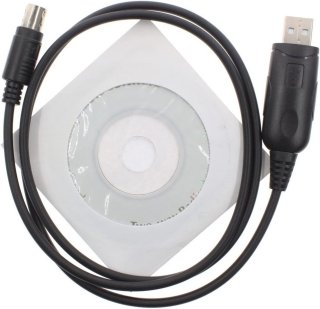
The CT-62 converter cable usually comes with a driver CD-ROM, which isn't needed with major Linux distributions.
This CT-62 cable version for the FT-817 uses a widely available FTDI USB-to-serial converter IC. The connector on one end fits into the rear ACC jack of the FT-817; the other end is a USB connector.
Installation
Before you start, please take a minute to read the disclaimer at the end of this article. It is written in German for legal reasons.
First of all, we need to install the FTDI library for Linux.
Open a terminal in Linux, type the following, and press ENTER:
sudo apt-get install libftdi1
Close all applications after the installation and restart your computer.
Check whether your computer recognizes the CT-62 adapter. Open a terminal and type:
dmesg | grep tty
The response should contain a line like this:
pl2303 converter now attached to ttyUSB0
If your Linux user account does not have permission to access the USB device (CT-62), this might fix it:
sudo usermod -a -G dialout <user>
where <user> is your user name on your computer.
Warning:
Be very careful with this. Your user name will be moved into the "dialout" group, which means that the sudo command will no longer work for you because of limited user rights.
If so, you need to fix this as a last step:
-
Switch off your computer.
-
Restart your computer while holding down the Shift key.
-
Your computer is now in recovery mode.
-
Go to the line with "recovery" and press ENTER.
-
The initial menu pops up.
-
Go to "root".
-
Press ENTER.
-
At this point, type:
sudo usermod -aG sudo <user> -
Press TAB until "OK" is highlighted.
-
Press ENTER.
-
The computer reboots.
-
Check your sudo privileges.
At this point, everything should be fine with the remote cable installation.
Configuring CQRLOG
Check the CAT baud rate of your FT-817 and make sure that the TRX control in CQRLOG uses the same baud rate: press Ctrl+P and go to the TRX control submenu.
Disclaimer (German):
Die hier beschriebenen Prozeduren habe ich an meinem Computer ausprobiert. Ich gebe keine Garantie für die Richtigkeit und Funktionsfähigkeit der in diesem Beitrag erklärten Prozeduren auf anderen Computern. Bitte beachten Sie, dass Sie ohne das nötige Grundwissen keine Veränderungen an Ihrem Computer vornehmen sollten, weil dies zu einem instabilen Verhalten Ihres Computers führen kann oder das System unbrauchbar werden kann. Gehen Sie also mit großer Umsicht vor und informieren Sie sich vor der Ausführung der in diesem Beitrag genannten Prozeduren diesbezüglich auch aus anderen Quellen.