Yaesu FT-847 Crossband-Repeater
Rolf Heine, DL6ZB
Version 1.3.2 – tested on the radio. Feedback welcome.
| Version | 1.3.2 |
|---|---|
| Radio | Yaesu FT-847 |
| Function | FM cross-band repeater, 2 m ↔ 70 cm, using the radio’s X-RPT function |
| Control | CAT via a COM port, 4800, 9600 or 57600 baud |
| System | Windows x64 with .NET 10 Desktop Runtime |
| Languages | Deutsch, English, 日本語, Italiano, Français, Español, Português (Brasil) |
| Download | ZIP with the program and manuals in English and German |
| License | Freeware |
FT-847 Crossband-Repeater is a small Windows program that runs a Yaesu FT-847 as an FM cross-band repeater between 2 m and 70 cm. The radio does the repeating itself, with its satellite mode and its cross-band repeat function in menu 41 (X-RPT). The program takes care of the direction: it follows the band on which a signal arrives.
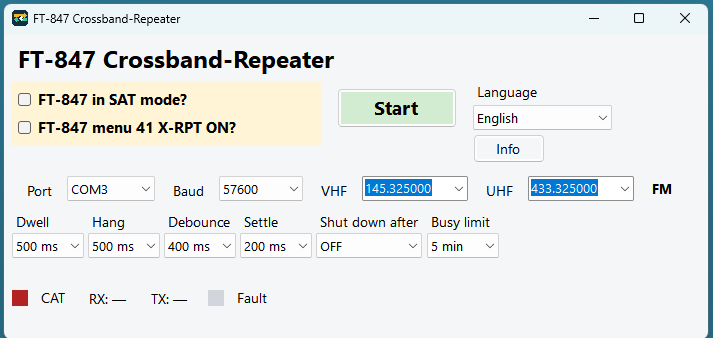
Everything fits in one compact window. Every field, button and indicator has a tooltip, and your settings are saved automatically.
Downloads: ZIP with the program and manuals (English and German)
How it works
In satellite mode with X-RPT switched on, the FT-847 retransmits a signal received on one band on the other band. The program talks to the radio through its CAT port and decides on which band the radio listens.
While the repeater runs, the program keeps an eye on the squelch. As long as the band is quiet, it swaps the satellite transmit and receive frequencies after an adjustable time, so the radio listens alternately on 2 m and on 70 cm. It always sets the transmit frequency first and then the receive frequency. When a signal arrives, the direction is held, and the radio switches the transmitter on and repeats the signal on the other band. When the squelch has been closed long enough, listening alternates again.
At the first swap the radio listens on 70 cm and transmits on 2 m.
Features
- One window with all controls: Start / Stop, Language and Info.
- Two checkboxes for the radio setup: FT-847 in SAT mode? switches the radio into satellite mode; FT-847 menu 41 X-RPT ON? confirms that X-RPT has been set on the radio.
- Port and Baud (4800, 9600 or 57600, as set in menu 37 of the radio).
- VHF and UHF frequency lists, in 10 Hz steps; you can pick a saved frequency or type a new one. Mode: FM.
- Adjustable timing: Dwell, Hang, Debounce and Settle set how quickly the program changes direction.
- Shut down after (OFF, 15, 30 or 60 min) sets an optional time limit for repeater operation; Busy limit (1, 3 or 5 min) ends it after a long uninterrupted signal.
- Indicators for CAT, the current direction (RX / TX) and Fault. While a signal is being repeated, RX and TX are highlighted.
- User interface in seven languages; the choice takes effect immediately.
- Port, baud rate, frequencies, times and language are saved automatically.
Requirements
- Yaesu FT-847
- A serial CAT connection between the PC (COM port) and the CAT port of the FT-847
- Windows x64
- The .NET 10 Desktop Runtime for Windows x64 (free from Microsoft: dotnet.microsoft.com)
- On the radio: satellite mode and menu 41 X-RPT set to ON
Getting started
- Install the .NET 10 Desktop Runtime (x64), unzip the download into a folder of your choice and start
Ft847Kreuzband.exe. There is no installer. - Select the port and the baud rate set in menu 37 of the radio, and enter your VHF and UHF frequencies. Set both frequencies to FM on the radio and set the output power on the front panel.
- Close the squelch and tick FT-847 in SAT mode? – the program switches satellite mode on.
- Set menu 41 X-RPT to ON on the radio by hand, then tick FT-847 menu 41 X-RPT ON?.
- Click Start. The same button then shows Stop, which ends repeater operation and switches satellite mode off again.
The manual explains every setting and indicator in detail.
Downloads
Download FT-847 Crossband-Repeater 1.3.2 (ZIP)Program for Windows x64 · manuals in English and German (PDF) · 527 KB
Manuals as separate PDFs:
- Manual (English) – PDF · 6 pages · 136 KB
- Handbuch (Deutsch) – PDF · 6 pages · 138 KB
SHA-256 (ZIP): a6ba1adf0c7ab8ee747413dce14889349e81c15c8318c26c190176f529cd0cb5
SHA-256 (Ft847Kreuzband.exe): 7cf366d441e53e19ac69028fcdba1c028fd1ad39bf1b1babc1389fc5208e2e14
Rechtliche Hinweise / Legal notes
Geltungsbereich: Bundesrepublik Deutschland. Es gilt ausschließlich deutsches Recht.
FT-847 Crossband-Repeater 1.3.2 wird als Freeware für den privaten Gebrauch und den Amateurfunk unentgeltlich zur Verfügung gestellt. Es handelt sich um eine freiwillige Leistung ohne Gewinnerzielungsabsicht. Copyright © 2026 Rolf Heine, DL6ZB. Weitergabe ist nur für nicht-kommerzielle Zwecke erlaubt, nur unverändert und mit diesem Copyright-Hinweis.
Yaesu ist eine Marke der Yaesu Musen Co., Ltd. Das Programm ist eine unabhängige Arbeit und steht in keiner Verbindung zu Yaesu. Rechte von Yaesu und anderen Rechteinhabern bleiben unberührt. Alle genannten Namen und Marken sind Eigentum ihrer jeweiligen Inhaber.
Den Crossband-Repeater (X-RPT) dürfen nur lizenzierte Funkamateure mit gültiger Amateurfunklizenz im Rahmen ihrer Zulassung betreiben. In Deutschland gelten das Amateurfunkgesetz (AFuG) und die Amateurfunkverordnung (AFuV). Der Betreiber ist für den Betrieb nach den geltenden Vorschriften verantwortlich.
Die Software wird ohne Gewährleistung bereitgestellt. Eine Haftung für Schäden, die aus der Verwendung entstehen, ist ausgeschlossen. Die Nutzung erfolgt auf eigenes Risiko.
Geräteschutz: Repeaterbetrieb bedeutet lange Sendezeiten (hohe Einschaltdauer). Sendeleistung angemessen wählen (z. B. max. 25 W), für Kühlung sorgen, Betrieb beaufsichtigen; Belegt max. und Abschalten nach nutzen.
EMVU: Der Betreiber muss die Vorschriften zum Schutz von Personen in elektromagnetischen Feldern einhalten, in Deutschland die Verordnung über das Nachweisverfahren zur Begrenzung elektromagnetischer Felder (BEMFV), einschließlich der Anzeige ortsfester Amateurfunkanlagen bei der Bundesnetzagentur (BNetzA).
Verantwortlich:
DL6ZB Rolf Heine Kirchenäcker 6 84048 Mainburg-Ebrantshausen GERMANYEnglish: Scope: Federal Republic of Germany; German law applies exclusively, and the German text is the legally binding version. FT-847 Crossband-Repeater 1.3.2 is provided free of charge as freeware for private use and amateur radio; it is a voluntary effort without any intention of making a profit. Copyright © 2026 Rolf Heine, DL6ZB. Distribution is allowed only for non-commercial purposes, only unchanged, and with this copyright notice. Yaesu is a trademark of Yaesu Musen Co., Ltd. The program is an independent work and is not connected with Yaesu; the rights of Yaesu and other rights holders remain unaffected. All names and trademarks mentioned are the property of their respective owners. Only licensed radio amateurs holding a valid amateur radio licence may operate the cross-band repeater (X-RPT), within the limits of their licence; in Germany, the Amateur Radio Act (AFuG) and the Amateur Radio Ordinance (AFuV) apply. The operator is responsible for operating within the applicable rules. The software is provided without warranty. Any liability for damage resulting from its use is excluded; use is at your own risk. Equipment protection: repeater operation means long transmit periods (a high duty cycle); choose a suitable transmit power (for example 25 W maximum), provide cooling, supervise operation, and use the busy limit and shut down after. EMF exposure: the operator must comply with the rules that protect people from electromagnetic fields; in Germany that is the BEMFV, including notification of fixed amateur radio installations to the Bundesnetzagentur (BNetzA). Responsible: see the address above.